Profit margin sounds like one of those business terms that should be complicated.
It really isn’t.
If you buy something for $50 and sell it for $80 you already know that you made $30. The part you may not know is what that $30 means as a percentage of the sale.
That percentage is your profit margin.
It can be useful when you sell products because two sales can make completely different amounts of money but have very different margins.
Want to check your profit margin without doing the math yourself? Use our Profit Margin Calculator to enter your costs and selling price and get the result in seconds.
Start With the Profit
Before you can find the profit margin you need to know the profit.
The calculation is simply:
Selling Price – Cost = Profit
So if a product costs $50 and you sell it for $80:
$80 – $50 = $30
You made $30.
Now we can work out the margin.
Profit ÷ Selling Price × 100 = Profit Margin
So:
$30 ÷ $80 × 100 = 37.5%
Your profit margin is 37.5%.
If you are checking several products at once you can also use our Profit Margin Calculator to do the calculation for you.
Here Is Why the Percentage Helps
Let’s say you sell two products.
One gives you $20 profit.
The other gives you $50.
Most people would look at that and say the second one is better.
But let’s add the prices.
The first product costs $40 and sells for $60.
The second costs $500 and sells for $550.
Now things look different.
The first product has a margin of 33.33%.
The second has a margin of only 9.09%.
You made more dollars on the second sale but the first product is giving you a much bigger return compared with its selling price.
This is one reason businesses pay attention to margin instead of only looking at the money left from each sale.
A Simple Example
Let’s say you sell a pair of shoes for $120.
You paid $75 for them.
Your profit is $45.
Nothing difficult so far.
Now divide that $45 by the $120 selling price:
$45 ÷ $120 = 0.375
Multiply it by 100 and you get 37.5%.
So the profit margin is 37.5%.
In other words $37.50 out of every $100 in sales represents profit before you take other business expenses into account.
Don’t Mix Up Margin With Markup
This is probably the most common mistake when talking about profit.
Margin and markup are not the same number.
Suppose you buy a product for $60 and sell it for $100.
You make $40.
For the margin:
$40 ÷ $100 × 100 = 40%
For the markup:
$40 ÷ $60 × 100 = 66.67%
So you have a 40% profit margin and a 66.67% markup.
The sale is exactly the same. The difference is what number you divide the profit by.
What If You Are Choosing the Selling Price?
Sometimes you are not looking at a finished sale.
You have a product in front of you and you are trying to decide what price to put on it.
Let’s say it costs you $80.
You want a 20% profit margin.
You might think that adding 20% to $80 gives you the answer.
It doesn’t.
If you want an actual 20% margin use:
Selling Price = Cost ÷ (1 – Desired Margin)
So:
$80 ÷ (1 – 0.20) = $100
Selling it for $100 gives you a $20 profit.
And $20 is 20% of the $100 selling price.
Be Careful With Discounts
A discount can make a product look more attractive to customers.
It also takes a bite out of your margin.
Imagine your product costs $60 and you normally sell it for $100.
Your profit is $40.
That means a 40% margin.
Now someone gets a 10% discount.
They pay $90.
Your profit drops to $30.
The new margin is:
$30 ÷ $90 × 100 = 33.33%
So you went from a 40% margin to 33.33%.
That is something worth checking before running a big sale.
Your Product Cost May Not Be the Whole Cost
This is another thing that can make your calculation look better than reality.
Imagine you buy an item for $50.
You pay $5 for shipping.
Then you spend another $5 on packaging.
Your real cost for that sale is now $60.
If you sell the item for $90 your profit is $30.
$30 ÷ $90 × 100 = 33.33%
If you had ignored the extra $10 you would have thought your margin was higher than it really was.
For a business with lots of small expenses these numbers can add up quickly.
What Happens When You Sell at a Loss?
Sometimes a product gets sold for less than it cost.
Maybe it is old stock or you simply need to get rid of it.
Say something cost you $100 and you sell it for $80.
You lost $20.
The calculation is:
-$20 ÷ $80 × 100 = -25%
So the profit margin is -25%.
A negative margin simply means the sale did not make a profit.
You Can Look at a Whole Month
Profit margin can also tell you how the business performed over a period of time.
Suppose you made $8,000 in sales last month.
Your costs came to $5,600.
That leaves $2,400.
Now divide:
$2,400 ÷ $8,000 × 100 = 30%
Your margin for the month was 30%.
This can be more useful than looking at one sale because it gives you an idea of what happened across the business.
The Formula Is Worth Remembering
If you want to calculate profit margin yourself just remember:
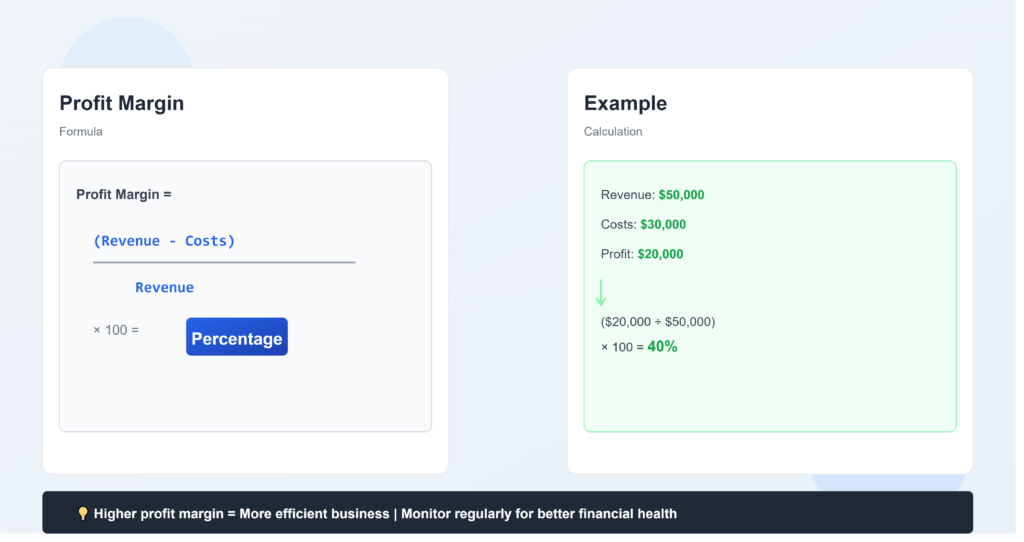
Profit Margin = (Selling Price – Cost) ÷ Selling Price × 100
Take the selling price.
Take away the cost.
Then divide the profit by the selling price.
For example a product costs $70 and sells for $100.
You made $30.
$30 ÷ $100 × 100 = 30%
That’s a 30% profit margin.
It really is that simple.
The useful part comes when you start using the number to compare products check your prices and see where your money is actually going.
Frequently Asked Questions
What does profit margin tell you?
It tells you what percentage of your selling price remains as profit after the cost is taken away.
Is a 30% profit margin good?
It can be good for one business and too low or too high for another. It depends on the industry costs competition and other expenses.
What is the difference between profit and profit margin?
Profit is the amount of money you make. Profit margin shows that amount as a percentage of the selling price.
Can a profit margin be negative?
Yes. If you sell something for less than its cost the margin will be negative.
Should I include other expenses?
If you want a more realistic number you should include costs that are connected to the sale such as shipping transaction fees packaging and similar expenses.